vulnlog report
Generates an HTML report from one or more Vulnlog files.
vulnlog report <file...> [filter flags] [-o <path>]Multiple files are merged and must share the same project metadata.
Use - as a file argument to read from stdin and -o - to write the report to stdout.
| Flag | Description |
|---|---|
|
Output file path, or |
|
Filter on reporter. |
|
Filter on release, include all releases up to and including that release. |
|
Filter on tags. Use multiple times to filter on multiple tags. |
|
Use as the file argument to read from stdin. |
Report contents
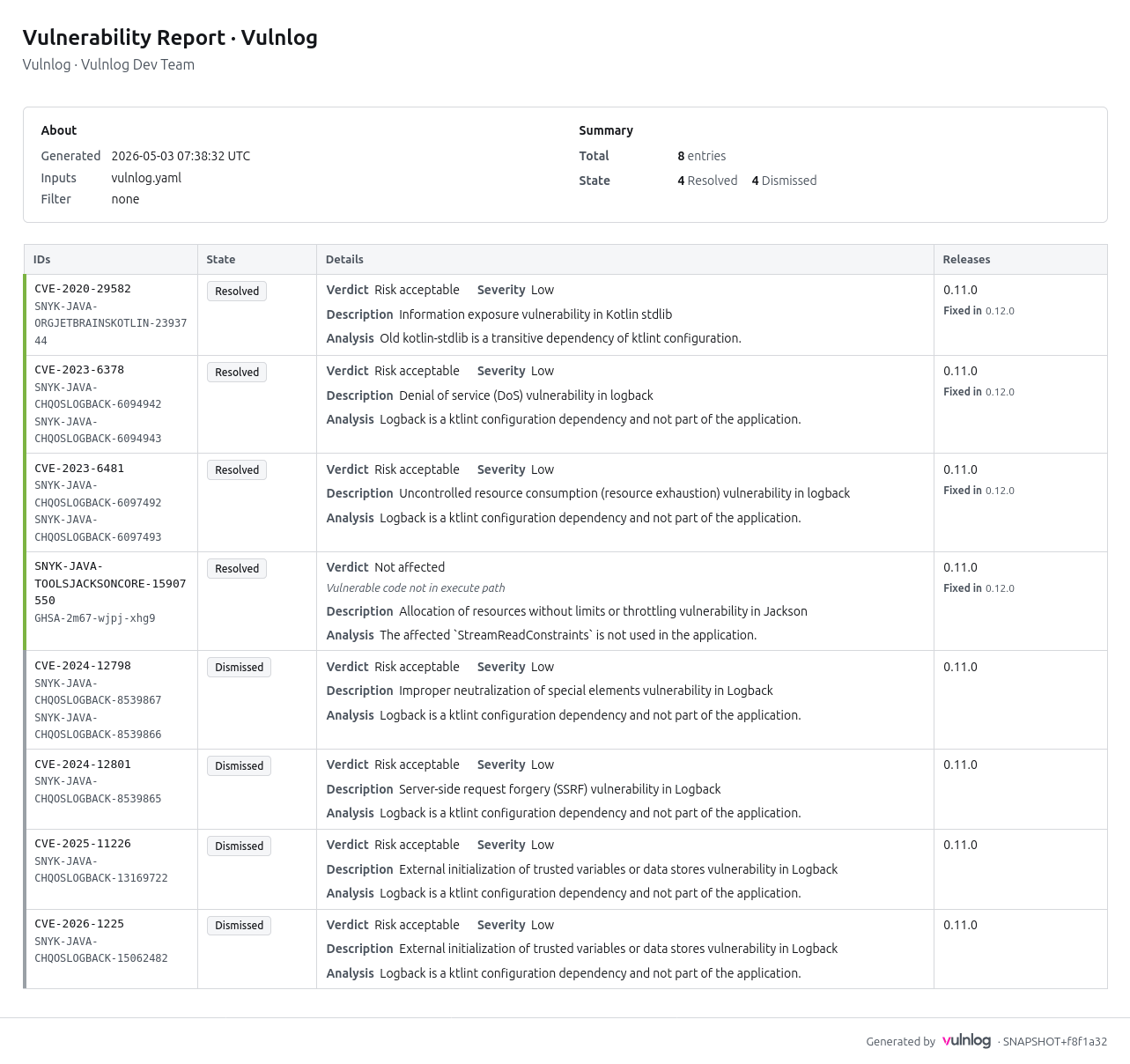
The rendered HTML is a single, self-contained document. It contains the following sections:
-
Header — project organization, name, and author; the ISO-8601 UTC generation timestamp; the list of input file names (visible when several files are merged); and the applied filter (release, tags, reporter).
-
Summary — total entry count, breakdown by state, and breakdown of open entries by severity.
-
Entry table — four columns (IDs, State, Details, Releases) sorted by state (open first), then severity (critical to low), then primary ID. Each row carries a coloured left stripe: green for resolved, grey for dismissed, severity-coloured for open entries, and uncoloured for entries under investigation. The Details cell shows the verdict, severity (where applicable), the VEX justification for
not affectedentries, and the entry’s description and analysis text. -
Footer — Vulnlog version and a link to vulnlog.dev.
The report is fully offline (no network requests), CSP-locked, print-friendly, and adapts to the reader’s light or dark system theme.
Examples
vulnlog report full-example.vl.yaml
Report written to: vulnlog-report.htmlvulnlog report frontend.vl.yaml backend.vl.yaml
Report written to: vulnlog-report.htmlTo generate an HTML report using the Vulnlog Docker container:
docker run --rm -v "$PWD:/work" ghcr.io/vulnlog/vulnlog:0.13.0 report vulnlog.yaml --output report.html
Report written to: /work/report.html
This renders an example Vulnlog HTML report: