Quickstart: read the impact report
In about five minutes you read a Vulnlog report and can state how the project is affected, by what, and which release ships each fix. You do not edit any file and you do not need a development environment.
Prerequisites
-
A Vulnlog HTML report. Your team generates it with
vulnlog report, often as a CI artifact. The examples below describe the report generated from this file:
acme-web-app.vl.yaml
# $schema: https://vulnlog.dev/schema/vulnlog-v1.json
---
schemaVersion: "1"

project:
  organization: Acme Corp
  name: Acme Web App
  author: Acme Corp Security Team

releases:
  - id: 1.0.0
    published_at: 2026-01-15
  - id: 1.1.0
    published_at: 2026-03-20
  - id: 1.2.0

vulnerabilities:

  - id: CVE-2026-8802
    releases: [1.1.0]
    packages: ["pkg:npm/session-store@1.4.0"]
    reports:
      - reporter: trivy
        at: 2026-07-01

  - id: CVE-2026-7791
    description: SQL injection in query-parser
    releases: [1.1.0]
    packages: ["pkg:npm/query-parser@5.2.1"]
    reports:
      - reporter: trivy
        at: 2026-05-15
    analysis: >-
      Confirmed exploitable through the search endpoint. Crafted filter expressions reach the vulnerable parser.
    analyzed_at: 2026-05-16
    verdict: affected
    severity: high
    resolution:
      in: 1.2.0
      at: 2026-06-20
      ref: "https://jira.example.com/browse/SEC-201"
      note: Updated query-parser from 5.2.1 to 5.3.0

  - id: CVE-2026-6685
    description: Denial of service in thumbnail-gen
    aliases: [SNYK-JS-THUMBNAILGEN-2984765]
    releases: [1.0.0]
    packages: ["pkg:npm/thumbnail-gen@2.0.0"]
    reports:
      - reporter: trivy
        at: 2026-04-02
        suppress: {}
    analysis: >-
      Confirmed but only exploitable with specially crafted image dimensions that the upload validation layer rejects.
    analyzed_at: 2026-04-03
    verdict: risk acceptable
    severity: low
    comment: Risk accepted by project lead. Revisit when thumbnail-gen 3.0 is released.

  - id: CVE-2026-1234
    description: Remote code execution in example-lib
    releases: [1.0.0]
    packages: ["pkg:npm/example-lib@2.3.0"]
    reports:
      - reporter: trivy
        at: 2026-02-01
    analysis: >-
      The vulnerable code path is not reachable in our application because we only use the safe subset of the API.
    analyzed_at: 2026-02-02
    verdict: not affected
    justification: vulnerable code not in execute path

  - id: CVE-2025-9876
    description: Authentication bypass in auth-middleware
    releases: [1.0.0]
    packages: ["pkg:npm/auth-middleware@3.0.2"]
    reports:
      - reporter: trivy
        at: 2026-01-20
    analysis: Confirmed. The bypass affects every session-authenticated route.
    analyzed_at: 2026-01-21
    verdict: affected
    severity: critical
    resolution:
      in: 1.1.0
      at: 2026-03-18
      ref: "https://jira.example.com/browse/SEC-158"
      note: Updated auth-middleware from 3.0.2 to 3.1.0
Step 1: Open the report
The report is a single HTML file that works offline and prints cleanly.
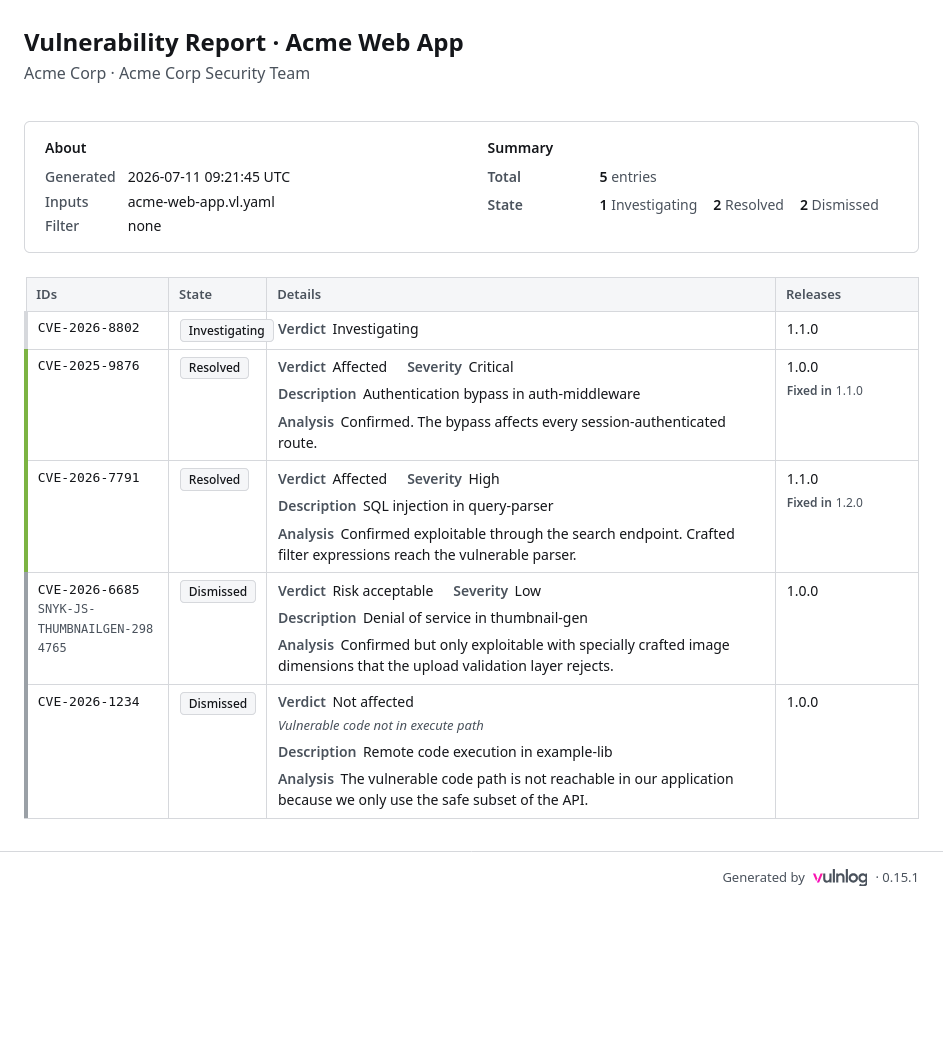
The header shows the project, the generation timestamp, and any filter that was applied. Check the filter first: a report scoped to a release answers "what does a user of that release face?", an unfiltered report shows the maintainer’s full backlog.
Step 2: Read the summary
The summary counts entries by state and breaks open entries down by severity. The four states, defined in Vulnerability states:
-
open: triage confirmed impact and no fix has shipped. These entries are the live risk; their severity tells you how urgent.
-
under investigation: the team has not concluded triage. Impact is unknown, not zero.
-
resolved: a fix is recorded. The Fixed In column names the release that ships it.
-
dismissed: closed without remediation, either not affected or an accepted risk.
Step 3: Read the entry table
For the example project, the unfiltered report reads:
-
CVE-2025-9876(critical) andCVE-2026-7791(high): resolved, fixed in 1.1.0 and 1.2.0. Whether your audience is protected depends on whether those releases shipped to them. -
CVE-2026-6685(low): dismissed as an accepted risk, with the project lead’s rationale in the details. -
CVE-2026-1234: dismissed as not affected, with the justification and analysis explaining why. -
CVE-2026-8802: under investigation.
The Details cell carries the verdict, the justification, and the analysis text, so the reasoning behind every decision is in the report itself.
What you can now state
"Acme Web App has no open vulnerability in the maintainer view; one finding is still under triage. Release 1.1.0 users face one high-severity issue whose fix ships with 1.2.0." Statements like these come directly from the summary, the state column, and Fixed In.
Next steps
-
Ask your team for a release-scoped report (
--release <id>) when you need the exposure of a specific shipped release; the release quickstart shows the difference. -
Vulnerability states explains the state model behind the report.