vulnlog report impact
Generates an impact report from one or more Vulnlog files. The report shows which vulnerabilities affect the project and which release ships each fix. Use it to decide whether a bugfix release is needed and what to update.
vulnlog report impact <file...> [filter flags] [-o <path>]Multiple files are merged and must share the same project metadata.
Use - as a file argument to read from stdin and -o - to write the report to stdout.
| Flag | Description |
|---|---|
|
Output file path, or |
|
Filter on reporter. |
|
Report the state as of this release.
Includes all releases up to and including that release.
A fix only counts once it has shipped inside that range.
A vulnerability whose |
|
Filter on tags. Use multiple times to filter on multiple tags. |
|
Filter on vulnerability state.
One of |
|
Filter on triage verdict.
One of |
|
Filter on the remediation intent recorded for affected entries.
One of |
|
Use as the file argument to read from stdin. |
Report contents
The rendered HTML is a single, self-contained document. It contains the following sections:
-
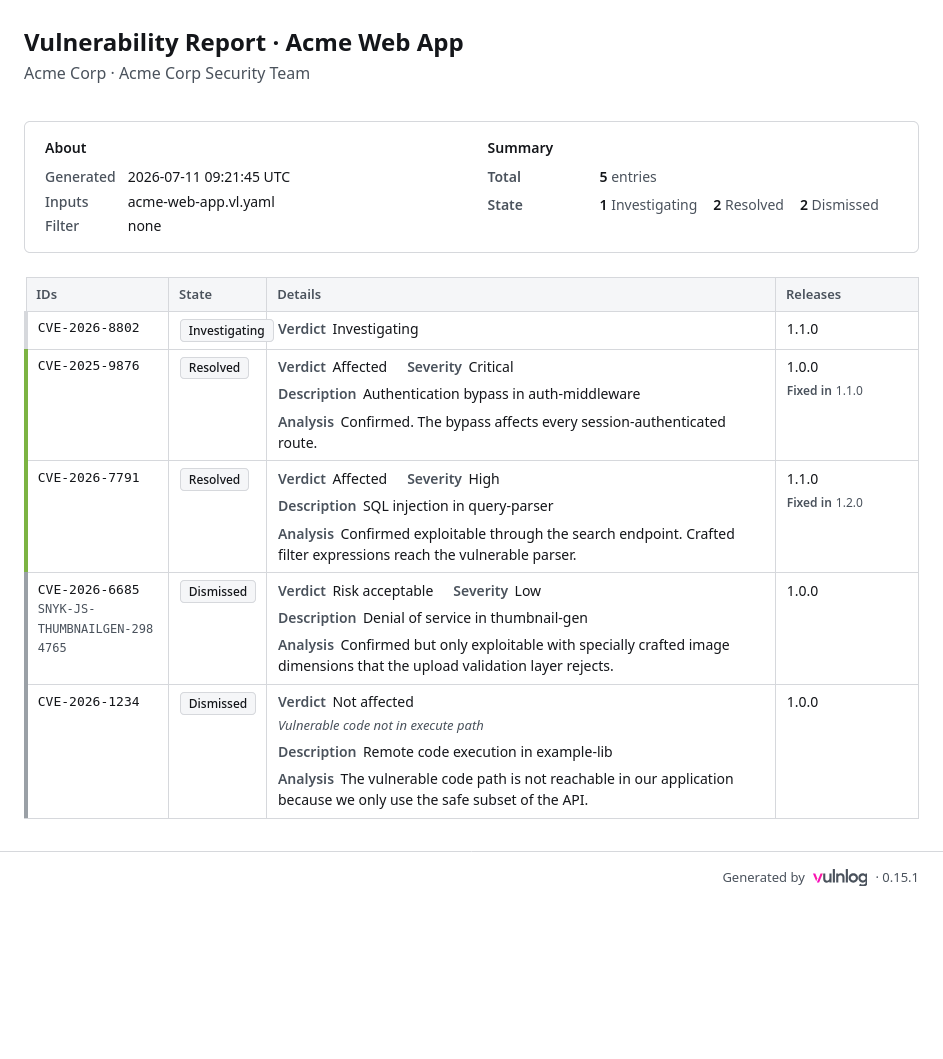
Header: project organization, name, and author; the ISO-8601 UTC generation timestamp; the list of input file names (visible when several files are merged); and the applied filter (release, tags, reporter).
-
Summary: total entry count, breakdown by state, breakdown of open entries by severity, and breakdown of accepted entries by severity.
-
Entry table: four columns (IDs, State, Details, Releases) sorted by state (open first), then severity (critical to low), then primary ID. Each row carries a coloured left stripe: green for resolved, violet for accepted, grey for not applicable, severity-coloured for open entries, and uncoloured for entries under investigation. The Details cell shows the verdict, severity, and disposition (each where applicable), the VEX justification for
not affectedentries, and the entry’s description and analysis text. The verdict is omitted while an entry is still under investigation, because no verdict has been recorded yet. -
Footer: Vulnlog version and a link to vulnlog.dev.
The report is fully offline (no network requests), CSP-locked, print-friendly, and adapts to the reader’s light or dark system theme.
Examples
vulnlog report impact full-example.vl.yaml
Wrote: vulnlog-impact-report.htmlvulnlog report impact frontend.vl.yaml backend.vl.yaml
Wrote: vulnlog-impact-report.htmlvulnlog -v report impact vulnlog.yaml --as-of 1.1.0
verbose: as-of filter expanded to releases: 1.0.0, 1.1.0
Wrote: vulnlog-impact-report.htmlTo generate an HTML report using the Vulnlog Docker container:
docker run --rm -v "$PWD:/work" ghcr.io/vulnlog/vulnlog:0.17.0 report impact vulnlog.yaml --output report.html
Wrote: /work/report.html
This renders an example Vulnlog HTML report:
When the command fails
The command exits non-zero on bad input. It never fails because the report contains vulnerabilities.
-
Unknown
--reporter,--as-of, or--tag: the command lists the known values and exits5. -
Input files with different project metadata: the command exits
2. -
No subcommand, as in
vulnlog report vulnlog.yaml: the command prints the available reports and exits1.
See Exit codes and messages for the full table.