Read the impact report
In this tutorial, you read the impact report of the Acme Shop project to find out how vulnerabilities affect it. You read the team’s assessment of each one and see which release fixes what. It takes about 10 minutes. You don’t edit any file, and you don’t need to know YAML.
The impact report is a single HTML file. It needs no network connection, and you can print it.
Before you start
-
Install the Vulnlog CLI. For instructions, see Install Vulnlog.
-
Have a web browser to open the report.
-
Create an empty directory and save the Acme Shop Vulnlog file in it as
acme-shop.vl.yaml:acme-shop.vl.yaml
# $schema: https://vulnlog.dev/schema/vulnlog-v1.json
---
schemaVersion: "1"

project:
  organization: Acme Corp
  name: Acme Shop
  author: Acme Product Security Team
  contact: security@acme.example

tags:
  - id: backend
    description: Java server application
  - id: frontend
    description: Web user interface
  - id: worker
    description: Python report worker
  - id: container
    description: Container image that bundles all components

releases:
  - id: 4.2.0
    published_at: 2026-03-02
    purls:
      - purl: "pkg:maven/com.acme/acme-shop-server@4.2.0"
        tags: [backend]
      - purl: "pkg:oci/acme-shop@sha256:cf9066b0fcef66d545007bd33b5d8d59e7434e37c2a23d19a3075fdb6f0b48b9"
        tags: [container]
  - id: 4.3.0
    published_at: 2026-06-15
    purls:
      - purl: "pkg:maven/com.acme/acme-shop-server@4.3.0"
        tags: [backend]
      - purl: "pkg:oci/acme-shop@sha256:23a5bff22a95119dc4bcef9422a20038eb3c2fd355f03928b02791273ff1cc27"
        tags: [container]
  - id: 4.4.0
    purls:
      - purl: "pkg:maven/com.acme/acme-shop-server@4.4.0"
        tags: [backend]
      - purl: "pkg:oci/acme-shop@sha256:350f97615163b67cbff8b015e60c77c2cbb954b4d9ffa9d48254e216e54899c8"
        tags: [container]

vulnerabilities:

  - id: CVE-2023-32681
    description: Proxy-Authorization header leak in requests
    releases: [4.3.0]
    packages: ["pkg:pypi/requests@2.28.2"]
    reports:
      - reporter: github-dependabot
        at: 2026-07-14
    tags:
      - worker
      - container

  - id: CVE-2024-3094
    name: XZ Utils backdoor
    description: Backdoor in the liblzma library of XZ Utils
    releases: [4.3.0]
    packages: ["pkg:deb/debian/xz-utils@5.4.1"]
    reports:
      - reporter: other
        at: 2026-07-02
        source: Customer inquiry
    tags: [container]
    analysis: >-
      The container image is based on Debian 12, which ships xz-utils 5.4.1. The backdoor is only in the upstream releases 5.6.0
      and 5.6.1.
    analyzed_at: 2026-07-02
    verdict: not affected
    justification: vulnerable code not present

  - id: CVE-2022-42889
    name: Text4Shell
    description: Remote code execution through string interpolation in Apache Commons Text
    releases:
      - 4.2.0
      - 4.3.0
    packages: ["pkg:maven/org.apache.commons/commons-text@1.9"]
    reports:
      - reporter: dependency-check
        at: 2026-05-20
    tags:
      - backend
      - container
    analysis: >-
      Acme Shop only uses StringEscapeUtils from Commons Text. The server never calls StringSubstitutor, which performs the vulnerable
      interpolation.
    analyzed_at: 2026-05-21
    verdict: not affected
    justification: vulnerable code not in execute path

  - id: CVE-2022-22965
    name: Spring4Shell
    description: Remote code execution through data binding in Spring Framework
    releases:
      - 4.2.0
      - 4.3.0
    packages: ["pkg:maven/org.springframework/spring-beans@5.3.15"]
    reports:
      - reporter: trivy
        at: 2026-04-07
        suppress:
          expires_at: 2027-03-31
    tags:
      - backend
      - container
    analysis: >-
      Acme Shop runs as a Spring Boot executable JAR on JDK 17. The published exploit needs a WAR deployment on Apache Tomcat,
      but Spring advises all users to upgrade.
    analyzed_at: 2026-04-08
    verdict: affected
    severity: medium
    disposition: will fix
    comment: Planned for 4.4.0 together with the Spring Boot update.

  - id: CVE-2021-23337
    description: Command injection through the template function in lodash
    releases:
      - 4.2.0
      - 4.3.0
    packages: ["pkg:npm/lodash@4.17.20"]
    reports:
      - reporter: npm-audit
        at: 2026-03-10
        suppress: {}
    tags: [frontend]
    analysis: >-
      The template function is only used in the admin interface, with templates that administrators write. Administrators can
      already change the shop configuration, so the injection gives them no additional access. The admin interface is removed
      in Acme Shop 5.0.
    analyzed_at: 2026-03-12
    verdict: affected
    severity: low
    disposition: wont fix

  - id: CVE-2021-44228
    name: Log4Shell
    description: Remote code execution through JNDI lookups in Apache Log4j
    aliases: [GHSA-jfh8-c2jp-5v3q]
    releases: [4.2.0]
    packages: ["pkg:maven/org.apache.logging.log4j/log4j-core@2.14.1"]
    reports:
      - reporter: grype
        at: 2026-03-10
      - reporter: other
        at: 2026-03-11
        source: Customer support request
    tags:
      - backend
      - container
    analysis: >-
      The server logs the User-Agent header with log4j-core 2.14.1. A crafted header triggers a JNDI lookup and runs attacker-controlled
      code.
    analyzed_at: 2026-03-11
    verdict: affected
    severity: critical
    disposition: will fix
    resolution:
      in: 4.3.0
      at: 2026-06-15
      note: Updated log4j-core from 2.14.1 to 2.17.1
Generate the report
In the directory that contains acme-shop.vl.yaml, generate the impact report:
vulnlog report impact acme-shop.vl.yamlWrote: vulnlog-impact-report.htmlOpen the report
Open vulnlog-impact-report.html in your web browser.
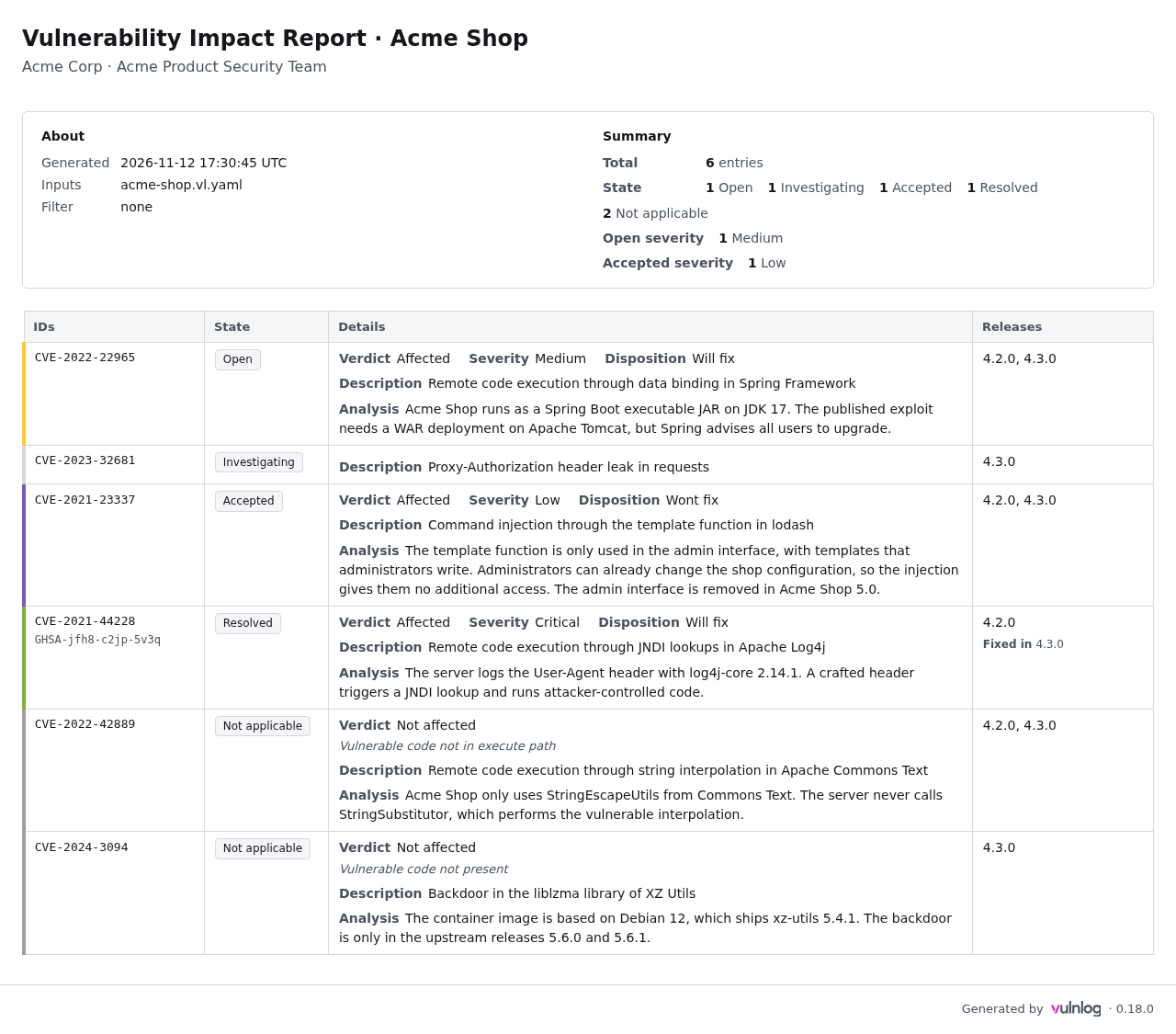
The heading names the report and the project: Vulnerability Impact Report for Acme Shop. Below it, you see the organisation, Acme Corp, and the team that maintains the file, the Acme Product Security Team.
Check what the report covers
The About box on the left tells you what you’re looking at:
-
Generated is the date and time the report was created, in UTC.
-
Inputs is the Vulnlog file the report comes from,
acme-shop.vl.yaml. -
Filter is
none.
A filter of none means the report shows every entry in the file.
A report can also show the state of one release, for example as of=4.3.0.
Always check this line before you draw conclusions, because a filtered report leaves entries out.
Read the summary
The Summary box on the right counts the entries:
-
Total is 6 entries.
-
State is 1 Open, 1 Investigating (the state
under investigation), 1 Accepted, 1 Resolved, and 2 Not applicable. -
Open severity is 1 Medium.
-
Accepted severity is 1 Low.
Entries in the state open affect Acme Shop and aren’t fixed yet, so start with them.
Here, one vulnerability of medium severity is open.
Read the table
Each row of the table is one vulnerability.
The rows are sorted by state, so open entries come first, and entries that don’t affect Acme Shop come last.
A coloured bar on the left edge of a row repeats the state, and for open entries the colour shows the severity.
Rows for entries under investigation and open entries without a severity have no bar.
The four columns are:
-
IDs: the vulnerability identifier, for example
CVE-2022-22965, and any other identifiers for the same vulnerability below it. -
State: where the team stands with the vulnerability.
-
Details: the team’s assessment.
-
Releases: the Acme Shop releases the vulnerability affects.
Go through the rows from top to bottom:
-
CVE-2022-22965is Open. The Details column shows Verdict Affected, Severity Medium, and Disposition Will fix. The team confirmed that Acme Shop is affected and plans a fix. The Analysis text explains why the risk is medium. -
CVE-2023-32681is Investigating. It has a Description but no verdict, because the team hasn’t finished its analysis. Until the team records a verdict, its impact is unknown. -
CVE-2021-23337is Accepted, with Disposition Wont fix. Acme Shop is affected, and the team accepted the risk. The Analysis says why: only administrators can reach the vulnerable function, and the admin interface goes away in Acme Shop 5.0. -
CVE-2021-44228is Resolved. Its second identifier,GHSA-jfh8-c2jp-5v3q, appears below the CVE. The Releases column shows 4.2.0 and Fixed in 4.3.0. -
CVE-2022-42889andCVE-2024-3094are Not applicable. Their verdict is Not affected, and the line in italics under the verdict gives the reason, for example Vulnerable code not present.
For the exact meaning of each state, see States.
Answer questions from the report
You can now answer the questions people usually ask about Acme Shop:
-
Is anything open? Yes, one vulnerability of medium severity, and the team plans to fix it.
-
Is anything still being analysed? Yes, one vulnerability,
CVE-2023-32681. -
Which risks has the team accepted? One low-severity vulnerability in the admin interface.
-
Is Log4Shell (
CVE-2021-44228) fixed? Yes, in release 4.3.0. Users of 4.2.0 are still affected.
What you’ve learned
Now you can:
-
Check which entries a report covers before you draw conclusions.
-
Read the state of each vulnerability and the team’s assessment behind it.
-
Answer common questions about a project from its impact report.
Next steps
-
See how the report changes for a single release in Find what affects your release.
-
Answer a customer’s question about one vulnerability in Answer a vulnerability inquiry.
-
Generate and share reports for your own project with Generate reports.
-
Learn how a state follows from the team’s assessment in Vulnerability states.